💡 핵심 요약 (TL;DR)
MAVEN REPOSITORY, My(i)Batis설치의 동작 원리를 이해하고 실제 프로젝트에 적용하기 위한 실무 가이드다.
* 필요한 라이브러리 코드들을 아래 공식 메이븐레파지토리에서 복사한 뒤 pom.xml에 붙여넣어서 사용 및 관리을 적용할 수 있다.
Maven(메이븐)
빌드도구 중의 하나
필요한 라이브러리 코드들을 아래 공식 메이븐레파지토리에서 복사한 뒤 pom.xml에 붙여넣어서 사용 및 관리
메이븐 공식 레파지토리(MAVEN REPOSITORY) 사이트 에 접속한 뒤 검색해서 원하는 것을 클릭한 후 코드를 복사해서 pom.xml의 test주석부분의 <dependencies>태그 안에 붙여넣기하면 된다
검색한 뒤 어떤 버전을 쓸지 모르겠다면? Usages가 가장 많은 것을 받으면 된다.
라이브러리 에러 해결방법 두 가지
프로젝트 우클릭 > Maven > project update (해당 파일 동기화)
C:\Users\ITWILL.m2\repository 폴더에 저장 되고 프로젝트 (강제로 삭제후 STS 재실행)
MyBatis(iBatis)란
SQL MAPPER 라이브러리
스프링 프레임워크와 같이 활용하여 효율적인 SQL 처리
반복되는 try~catch 구문, pstmt, rs 객체를 대신 처리
XML/애노테이션 형태로 SQL구문 사용가능
스프링과 자동으로 연동되어 처리되는 라이브러리를 제공한다.
장점 : 동적 SQL문 사용가능
동적 SQL구문이란 SQL구문안에 반복문과 조건문 사용가능한 형태
MyBatis(iBatis) 사용 방법 2가지
MyBatis 설치 메이븐 레포지토리에서 아래와 같이 4개의 라이브러리 코드를 복붙한다.
1
2
3
4
5
6
7
8
9
10
11
12
13
14
15
16
17
18
19
20
21
22
23
24
25
26
27
28
29
<!-- https://mvnrepository.com/artifact/org.springframework/spring-jdbc --> <dependency> <groupId>org.springframework</groupId> <artifactId>spring-jdbc</artifactId> <version>5.2.9.RELEASE</version> </dependency> <!-- https://mvnrepository.com/artifact/org.springframework/spring-test --> <dependency> <groupId>org.springframework</groupId> <artifactId>spring-test</artifactId> <version>5.2.9.RELEASE</version> <scope>test</scope> </dependency> //위의 코드 두 개를 버전 수정 <!-- https://mvnrepository.com/artifact/org.springframework/spring-jdbc --> <dependency> <groupId>org.springframework</groupId> <artifactId>spring-jdbc</artifactId> <version>${org.springframework-version}</version> </dependency> <!-- https://mvnrepository.com/artifact/org.springframework/spring-test --> <dependency> <groupId>org.springframework</groupId> <artifactId>spring-test</artifactId> <version>${org.springframework-version}</version> </dependency>
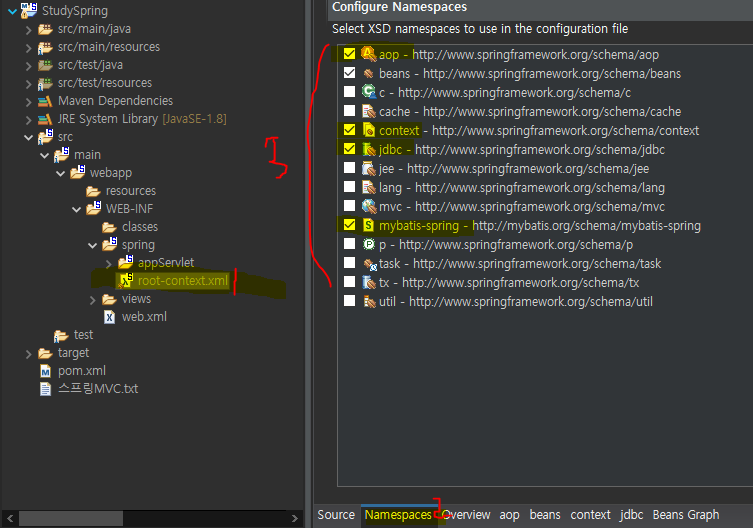
MyBatis로 DB연결 위의 4가지 라이브러리를 설치 후 root-context.xml에 속성을 처리해준다.
아래 사진처럼 root-context.xml의 Namespaces속성에 위에서 추가한 라이브러리들을 tick한다.
이제 root-context.xml에 DB연결객체를 생성하여 DB를 연결할 수 있다.
SqlSessionFactory 객체 : Connection을 생성하고 사용하는 객체 + MyBatis설정까지 가능한 객체
SqlSessionFactoryBean 클래스를 사용해야함
1
2
3
4
5
6
7
8
9
10
11
12
13
14
15
16
17
18
19
20
21
22
23
24
25
26
27
28
29
<?xml version="1.0" encoding="UTF-8" ?> <beans xmlns ="http://www.springframework.org/schema/beans" xmlns:xsi ="http://www.w3.org/2001/XMLSchema-instance" xmlns:aop ="http://www.springframework.org/schema/aop" xmlns:context ="http://www.springframework.org/schema/context" xmlns:jdbc ="http://www.springframework.org/schema/jdbc" xmlns:mybatis-spring ="http://mybatis.org/schema/mybatis-spring" xsi:schemaLocation ="http://www.springframework.org/schema/jdbc http://www.springframework.org/schema/jdbc/spring-jdbc-4.3.xsd http://mybatis.org/schema/mybatis-spring http://mybatis.org/schema/mybatis-spring-1.2.xsd http://www.springframework.org/schema/beans https://www.springframework.org/schema/beans/spring-beans.xsd http://www.springframework.org/schema/context http://www.springframework.org/schema/context/spring-context-4.3.xsd http://www.springframework.org/schema/aop http://www.springframework.org/schema/aop/spring-aop-4.3.xsd" > <bean id ="dataSource" class ="org.springframework.jdbc.datasource.DriverManagerDataSource" > <property name ="driverClassName" value ="com.mysql.jdbc.Driver" /> <property name ="url" value ="jdbc:mysql://localhost:3306/springdb?useSSL=false" /> <property name ="username" value ="root" /> <property name ="password" value ="1234" /> </bean > <bean id ="sqlSessionFactory" class ="org.mybatis.spring.SqlSessionFactoryBean" > <property name ="dataSource" ref ="dataSource" /> <property name ="configLocation" value ="classpath:/Mybatis-config.xml" /> </bean > </beans >
#TIL ITWILL(JAVA)