💡 핵심 요약 (TL;DR)
I/O4: NIO의 동작 원리를 이해하고 실제 프로젝트에 적용하기 위한 실무 가이드다.
* 지금 file클래스보다는 Path와 files 라이브러리를 사용.
- 자바7버전부터 이용가능.
- 기존 I/O를 대체하는 개념이 아닌 다른 특성을 가진 I/O이다.
- 지금 file클래스보다는 Path와 files 라이브러리를 사용.
- 장점 : 다수의 클라이언트환경, 짧은 입출력 작업에 적합.
- I/O가 더 유리한 경우 : 대용량 처리, 소수의 클라이언트 환경
Java IO vs NIO

Path와 Files
I/O가 File 하나로 파일 관련 요소들을 관리하던 것을 NIO에서는 Path, Files로 분리해서 관리한다.
- java.nio.file.Path 인터페이스 : java.io.File과 거의 동일하다.
- java.nio.files.Files 클래스 : java.io.File과 유사하지만 객체생성 필요없이 메서드로 바로 사용할 수 있어 더 편리하다.
1
2
3
4
5
6
7
8
9
10
11
12
13
14
15
16
17
18
19
20
21
22
23
24
25
26
27
28
29
30
31
32
33
34
35
36
37
38
39
40
41
42
43
44
45
46
47
48
49
50
51
52
53
54
55
56
57
58
59
60
61
62
63
64
65
| public static void main(String[] args) throws IOException {
FilesTest ft = new FilesTest();
ft.copyTest();
ft.dirInfo();
ft.readTextFile();
ft.deleteTest();
}
public void copyTest() throws IOException{
Path src = Paths.get("c:/windows/explorer.exe");
Path target = Paths.get("C:/Temp/files_copy_explorer.exe");
if(Files.isReadable(src)){
Files.copy(src, target, StandardCopyOption.REPLACE_EXISTING);
System.out.println("복사완료");
}
}
public void dirInfo() throws IOException{
Path target = Paths.get(".");
DirectoryStream<Path> dirStream = Files.newDirectoryStream(target);
for(Path p : dirStream){
Date time = new Date(Files.getLastModifiedTime(p).toMillis());
String name = p.getFileName().toString();
long length = Files.size(p);
if(Files.isDirectory(p)){
name = "["+name+"]";
}
System.out.printf("%-20s\t%tF %<tT\t%s%n", name, time, length);
}
}
public void readTextFile() throws IOException{
Path target = Paths.get("./form.xml");
BufferedReader reader = Files.newBufferedReader(target);
String line = null;
while ((line = reader.readLine()) != null){
System.out.println(line);
}
List<String> lines = Files.readAllLines(target);
for(String line2 : lines) System.out.println(line2);
}
public void deleteTest() throws IOException {
Path target = Paths.get("C:/Temp/files_copy_explorer.exe");
boolean result = Files.deleteIfExists(target);
String resultStr = result ? "삭제성공" : "삭제실패";
System.out.println(resultStr);
}
복사완료
.classpath 2020-06-10 12:32:21 301
.project 2020-06-10 12:32:21 384
[.settings] 2020-08-18 10:42:17 0
[bin] 2020-08-17 11:15:56 4096
config.properties 2020-08-13 12:24:25 96
form.xml 2020-08-18 11:16:11 85
googleImg.png 2020-08-18 09:45:40 4273
mylog_0.log 2020-07-23 11:12:50 1313
[src] 2020-08-17 11:15:55 4096
<사람></사람>
<이름>김하지</이름>
<나이>77</나이>
<총점></총점>
삭제완료
|
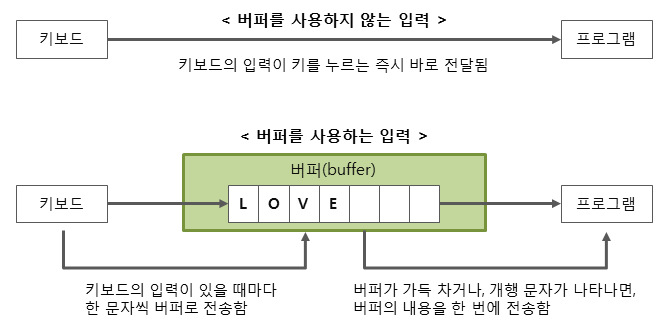
Buffer
- read/write가 가능한 메모리상의 배열.
- NIO에서 모든 입출력이 버퍼를 통해서 이루어짐.
- 장점 : I/O 성능 향상.
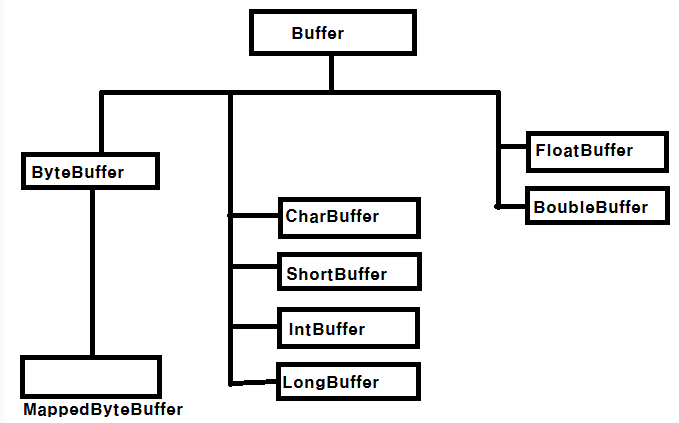
- 데이터타입에 따른 종류
- 다양한 타입의 버퍼가 있지만 실제로 채널은 ByteBuffer를 통해서만 데이터를 읽고 쓸 수 있다.
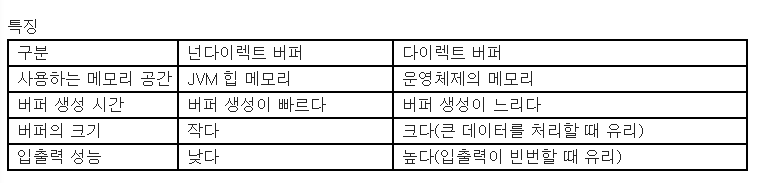
- 메모리 위치에 따른 종류
- 다이렉트버퍼 : OS메모리에 위치.
- 넌다이렉트버퍼 : JVM 힙메모리에 위치.
java.nio.channel.FileChannel
- 파일을 읽고 쓰는데 사용되는 채널.
- 동기화되어있어 멀티스레드 환경에 안전.
- open()과 close()로 FileChannel을 열고 닫음.
- 읽기전용 :
FileChannel readChannel = FileChannel.open(srcPath, StandardOpenOption.READ
- 파일생성하고 쓰기 :
FileChannel readChannel = FileChannel.open(srcPath, StandardOpenOption.READ
- 사용한 후에는 close()로 꼭 닫아야함.
- read()할때 읽은 데이터수가 리턴. 더이상 읽을 데이터가 없을땐 -1리턴
#TILITWILL(JAVA)