💡 핵심 요약 (TL;DR)
JQuery 사용설정, 선택자, css()의 동작 원리를 이해하고 실제 프로젝트에 적용하기 위한 실무 가이드다.
* JQuery : 자바스크립트의 라이브러리 언어 (자주 사용하는 기능만 모아놓은 언어)을 적용할 수 있다.
JQuery
- JQuery : 자바스크립트의 라이브러리 언어 (자주 사용하는 기능만 모아놓은 언어)
- 공부할 주요 내용은 아래 세가지 : 선택자, Ajax, Json
- js쓰면 되는데 왜 굳이 JQuery를 쓸까?
- JQuery document
JQuery 다운로드
- JQuery 사이트 방문 > download 탭 선택
- Download the compressed, production jQuery 3.5.1 클릭 > 다른 이름으로 바탕화면에 저장
- Download the uncompressed, development jQuery 3.5.1 클릭 > 다른 이름으로 바탕화면에 저장
- Download the compressed, production jQuery 3.5.1 slim build 클릭 > 다른 이름으로 바탕화면에 저장
- Download the uncompressed, development jQuery 3.5.1 slim build 클릭 > 다른 이름으로 바탕화면에 저장
다운로드 받은 파일들의 차이점
- 이름에 min 유무 : 원본에서 주석없애고 압축해서 만든 파일이 min파일이다.
- min파일은 데이터를 읽어들이는 속도가 상대적으로 빠르다
- 그럼 무조건 min을 써야할까?
- NOPE! 하고있는 작업에 따라 다르다. 초단위로 속도가 중요한 프로젝트면 min을 써야한다
- 이름에 slim 유무 : min에서 더 slim하게 만든 파일.
JQuery를 내 프로젝트에 연결하는 두 가지 방법
- 내 로컬에서 제이쿼리 라이브러리 추가 : 직접 다운로드해서 연결
- 네트워크 전송방식 라이브러리 추가 : Google CDN > 3.x snippet 코드를 복붙
- 네트워크상황이 안 좋을 경우 에러가 발생할 수 있으므로 보통으 라이브러리를 직접 다운로드해서 사용한다.
1
2
3
4
5
|
<script type="text/javascript" src="../js/jquery-3.5.1.min.js"></script>
<script src="https://ajax.googleapis.com/ajax/libs/jquery/3.5.1/jquery.min.js"></script>
|
프로젝트 생성하기
- 새로운 dynamic web project생성
- 생성한 프로젝트 우클릭 > properties > java build path > add library > server runtime > Tomcat설정하기
- JQuery 라이브러리 다운로드 받기 : 보통은 jquery-3.5.1.min.js을 사용한다.
- 프로젝트 > webcontent > js 폴더를 생성하고 다운로드 받은 JQuery라이브러리를 넣는다.
- webcontent에 test.jsp생성 후 script태그로 연결하기
- 프로젝트 우클릭 > 설정 > tern > modules > JQuery 두 개 클릭 후 저장
- 이제 Test1.jsp페이지 생성 후 코딩하면 됨!
제이쿼리 사용법
- 총 3가지 방법이 있다.
- 실무에선 주로 첫번째방법과 두번째방법을 사용한다.
- 제이쿼리와 자바스크립트 코드가 있다면 실행순서는 자바스크립트 먼저이다.
- 실행순서 :
- 자바스크립트
- HTML
- 제이쿼리
1
2
3
4
5
6
7
8
9
10
11
12
13
14
15
16
17
18
| <script type="text/javascript">
$(document).ready(function(){
alert("제이쿼리사용1")
});
$(function(){
alert("제이쿼리사용2")
});
jQuery(document).ready(function(){
alert("제이쿼리사용3")
});
alert("자바스크립트 사용")
</script>
|
제이쿼리 선택자
- 선택자 : 특정 동작이 적용될 대상

선택자 종류 : 직접선택자, 속성탐색선택자
- 직접선택자

- 전체 선택자종류
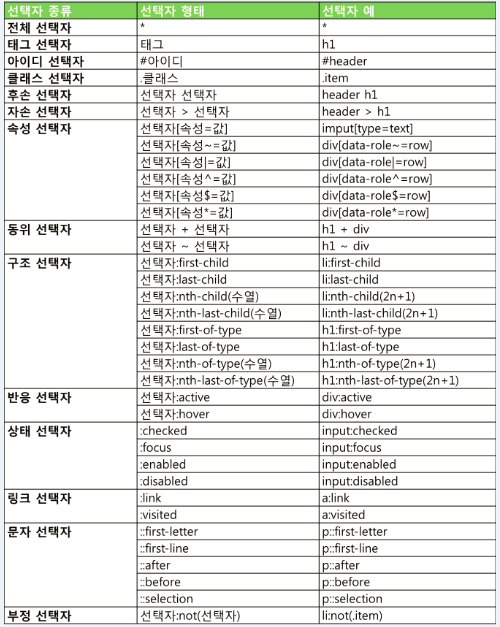
선택자 예시
1
2
3
4
5
6
7
8
9
10
11
12
13
14
15
16
17
18
19
20
21
22
23
24
25
26
27
28
29
30
31
32
33
34
35
36
37
38
39
40
41
42
43
44
45
46
47
48
49
50
51
52
53
54
55
56
57
58
59
60
61
62
63
64
65
66
67
68
69
70
71
72
73
74
75
76
77
78
79
80
81
82
83
84
85
|
<script type="text/javascript" src="../js/jquery-3.5.1.min.js"></script>
<script type="text/javascript">
$(function(){
$('*').css('color', 'green');
$('h1').css('color', 'red');
$('#t1').css('color', 'red');
$('h1#t1').css('color', 'orange');
$('.c1').css('color', 'blue');
$('input[name^=i]').val('홍');
$('input[type=password]').val('1234');
$('input[type$=t]').val('테스트');
$('input[name$=d]').val('테테');
$('tr:first').css('background', 'yellow');
$('tr:last').css('background', 'lightblue');
$('tr:odd').css('background', 'powderblue');
$('tr:even').css('background', 'aquamarine');
$('tr:first').css('background', 'yellow');
});
</script>
</head>
<body>
<h2>WebContent/jq/Test2.jsp</h2>
<h1 id="t1">제목1</h1>
<h1 class="c1">제목2</h1>
<h1 class="c1">제목3</h1>
<h1>제목4</h1>
<hr>
내용
<hr>
아이디 : <input type="text" name="id"><br>
비밀번호 : <input type="password" name="pw"><br>
<hr>
<table>
<tr>
<td>이름</td>
<td>혈액형</td>
<td>지역</td>
</tr>
<tr>
<td>사용자1</td><td>A</td><td>부산</td>
</tr>
<tr>
<td>사용자2</td><td>B</td><td>서울</td>
</tr>
<tr>
<td>사용자3</td><td>O</td><td>대구</td>
</tr>
<tr>
<td>사용자4</td><td>AB</td><td>제주</td>
</tr>
</table>
</body>
|
제이쿼리 css함수사용
1
2
3
4
5
6
7
8
9
10
11
12
13
14
15
16
17
18
19
20
21
22
23
24
25
26
27
28
29
30
31
32
33
34
35
36
37
38
39
40
41
42
43
44
45
46
|
<script type="text/javascript" src="../js/jquery-3.5.1.min.js"> </script>
<script type="text/javascript">
$(function(){
let c1 = $('h2').css('color');
console.log("색상변경전 : "+c1);
let c2 = $('h2').css('color');
console.log("색상변경후 : "+c2);
let col = ['dodgerBlue', 'orange', 'darkgreen', 'tomato'];
$('h2').css('color',function(index){
alert(index+"!!!!");
return col[index];
})
$('h2').css({
color:'tomato',
backgroundColor: "gray"
});
$('h2').css({
color:'black',
backgroundColor: function(index){return col[index]}
})
});
</script>
</head>
<body>
<h1>WebContent/jq/Test3.jsp</h1>
<h2> head-0 </h2>
<h2> head-1 </h2>
<h2> head-2 </h2>
<h2> head-3 </h2>
<h2> head-4 </h2>
|
#ITWILL(JAVA)jQuery